Maritime Digital Twins with Unreal Engine: Inside PropVR's Bahri Vessel Experience
· Srinath Kandala, Co-Founder, PropVR
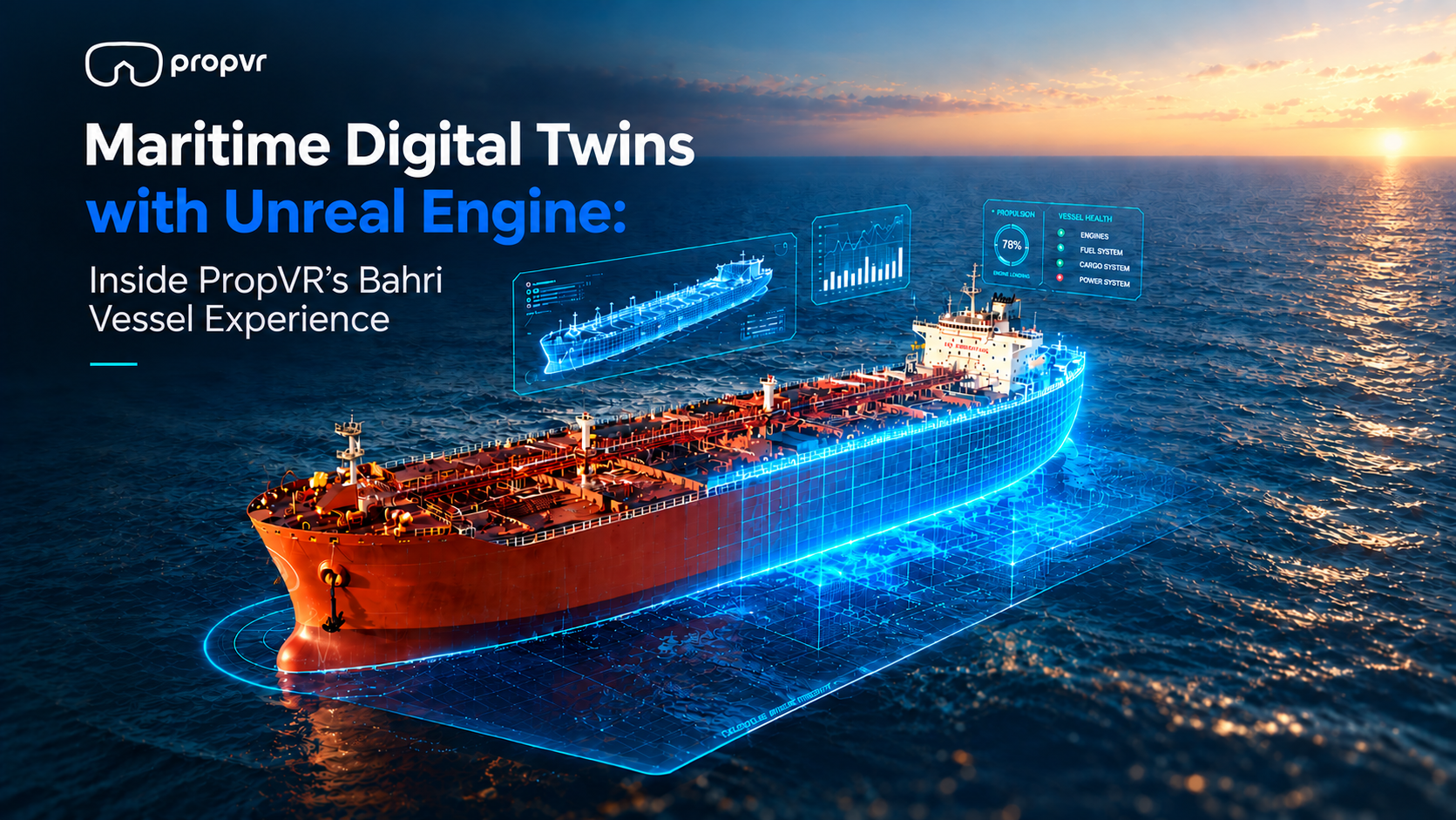
Step onboard. Without stepping onboard.
You can't bring a chemical tanker into a meeting room. You can't take an investor into the engine room. And you certainly can't fly every stakeholder offshore because someone needs to understand how the cargo systems are laid out.
So we spent five days on one instead, with drones and laser scanners.
Watch: the Bahri vessel digital twin in 60 seconds → https://www.linkedin.com/feed/update/urn:li:activity:7429425163470811137
How we matched LiDAR point cloud data to a CAD-built 3D model in Unreal Engine to create a real-time ship digital twin
We worked with Bahri to capture Fatimah, a 183-metre Medium Range chemical and oil products tanker, and rebuild her as a measurement-accurate real-time environment. Fifteen people, including our Unreal Engine developers, delivered it in five weeks. It runs today on a laptop, in a browser, in VR, on a touchscreen kiosk and on a holobox, and Bahri uses it for investor presentations, client meetings, remote training and crew familiarisation.
Here's how it was built.
The vessel
Medium Range (MR) chemical and oil products tanker
IMO 9917830
183 metres length overall
55,202 metric tonnes deadweight
33,817 gross tonnage
22 to 26 marine officers aboard
Captured in five days; delivered in five weeks by a team of fifteen
You can't walk an investor through an engine room
The brief wasn't "make the ship look good." Bahri already had renders, and good ones.
The actual problem was harder. A vessel is a place, and places don't explain well. An investor needs to grasp the scale and sophistication of the asset. A client wants to understand the cargo systems. Someone joining the crew needs to know the layout of an engine room before they're standing in one. Drawings show you a slice. Photographs show you a moment. A render shows you whatever the person who made it decided to show you. The viewer is left assembling a ship in their head out of fragments.
Walking someone through the vessel solves all of that at once. But a working chemical tanker is about the worst venue you could pick. Safety restrictions, port windows, travel costs, and an operating schedule that doesn't rearrange itself around your Tuesday meeting.
So we built a version of the vessel that's always available.
Five days on board with a laser scanner
Most 3D vessel work starts and ends with a model built from drawings. That gets you something that looks like the ship. It doesn't get you something that measures like the ship, and those aren't the same thing.
We went to the vessel instead. Getting there took legal clearance to put our team aboard a live chemical tanker, which is not a small thing to arrange and is worth understanding before anyone assumes this kind of project starts in a studio. It doesn't. It starts with paperwork and a safety briefing.
Once we were on, the capture ran for five days. Five days for 183 metres of ship, inside and out, from the forecastle to the third floor of the engine room. Drones handled the exterior and the areas nobody should be climbing on. Ground-level LiDAR cameras covered the decks, the accommodation block and the engine spaces. Between them, we came away with a point cloud of the tanker as she actually exists. Not as she was specified on paper. As she was built, fitted out, and modified across years of service.
A point cloud on its own isn't much use to anyone. It's millions of measured points floating in space. You can't texture it, light it, or walk through it convincingly. What it is, is the truth. Everything we built afterwards had to answer to it.
What the scan gives you that a drawing never will is everything nobody thought to document. Go into the engine room in the finished twin, and you can read the stickers on the equipment. The banners and signage in the captain's room, the labels through the interiors, the small printed things nobody thinks of as part of a ship - they're all there, because they were all there on the day. None of that could have been modelled from a drawing. It exists because we went and captured the real vessel.
"With a vessel this size you have two choices. You model from the general arrangement drawings and accept that what you deliver is an approximation, or you go and capture the ship. We did both, and then we matched them against each other. Overlaying the CAD-built model onto the point cloud is what allows us to say the dimensions in that environment are the vessel's own, not our interpretation of them. For anything that will be used in training, that distinction is the entire point."
- Sunder Jagannathan, Co-Founder, PropVR
Where the accuracy actually comes from
While the scanning was happening, the vessel was also being modelled in Autodesk 3ds Max from engineering CAD data and reference drawings.
The real work was reconciling the two. We overlaid the 3D model onto the scan data and corrected the geometry wherever the drawings and the physical vessel disagreed. On any working ship, they disagree more than you'd expect. Equipment gets moved. Pipe runs change. Fit-out details evolve. Clearances on paper aren't always clearances in steel.
That reconciliation is the whole ballgame. It's the difference between a vessel that's convincing and a vessel that's correct. It matters for training, because distances and clearances someone learns digitally should match what they meet physically. And it matters for credibility, because the people Bahri show this to have spent their careers around vessels like this one. They notice.
Both inputs then went into Unreal Engine 5 together - the point cloud and the CAD-built model, overlaid and matched against each other - and we built the application on top of the result.
"The engineering problem was never fidelity on its own. It was reconciling fidelity with real time. Point cloud data will not hold frame rate as it comes, so the work was bringing both inputs into Unreal Engine and rebuilding them there - retopology, LODs, material reconstruction, zone-based streaming - without losing the measurements sitting underneath. Keeping a fully modelled engine room responsive while the exterior and the ocean are still loaded is where a large share of those five weeks went."
- Srinath Kandala, Co-Founder, PropVR
Getting a scanned ship into Unreal Engine
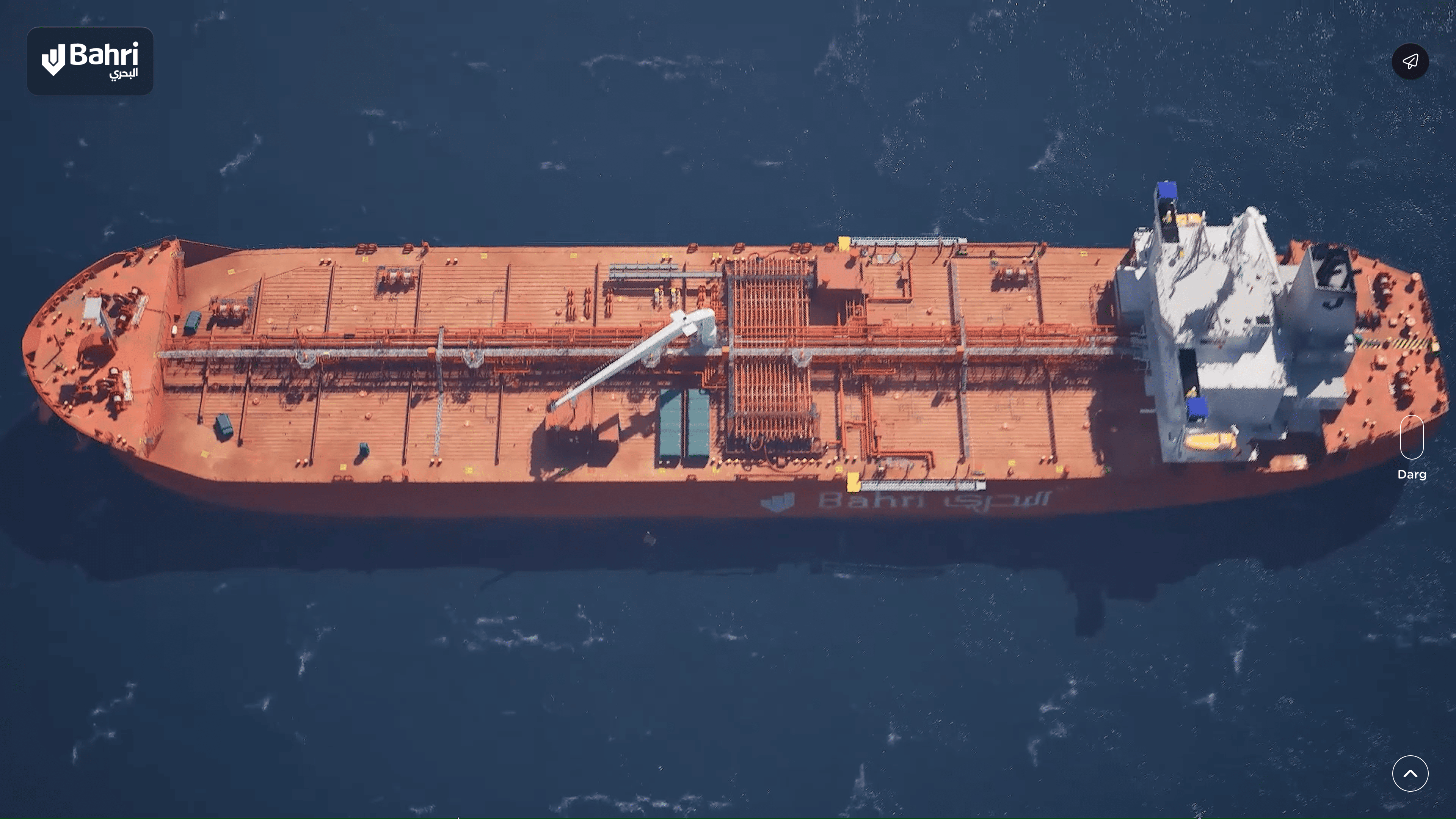
Survey accuracy and real-time performance want opposite things. Scan-derived geometry is heavy. A real-time environment has to redraw itself sixty times a second.
So the geometry was rebuilt for real-time rendering, UVs were unwrapped, and materials were reconstructed using physically based rendering. Then we organised the vessel into navigable zones:
Forecastle
Main Deck
Accommodation
Poop Deck
Engine Room
That zoning turned out to be the spine of the entire project. It shapes how people move around the vessel, and it's also the reason a ship this size stays interactive at all.
The parts of a ship nobody photographs
Between 22 and 26 marine officers live aboard Fatimah, and a vessel that people live on is not only a machine. So we captured the accommodation as carefully as the engine spaces: private cabins, en-suite bathrooms, messrooms and lounges, the galley and the catering spaces.
It would have been easy to treat those as secondary and concentrate the effort on cargo systems and machinery. That would have been a mistake. For anyone joining the vessel, the accommodation block is where the first day actually happens - where you sleep, where you eat, where you find your way to everything else from. A familiarisation tool that skips it is teaching half a ship.
There's a commercial version of the same argument. When Bahri shows the vessel to an investor or a charterer, the accommodation is what makes the asset read as a working environment with people in it rather than a hull with tanks in it.
Looking inside the hull
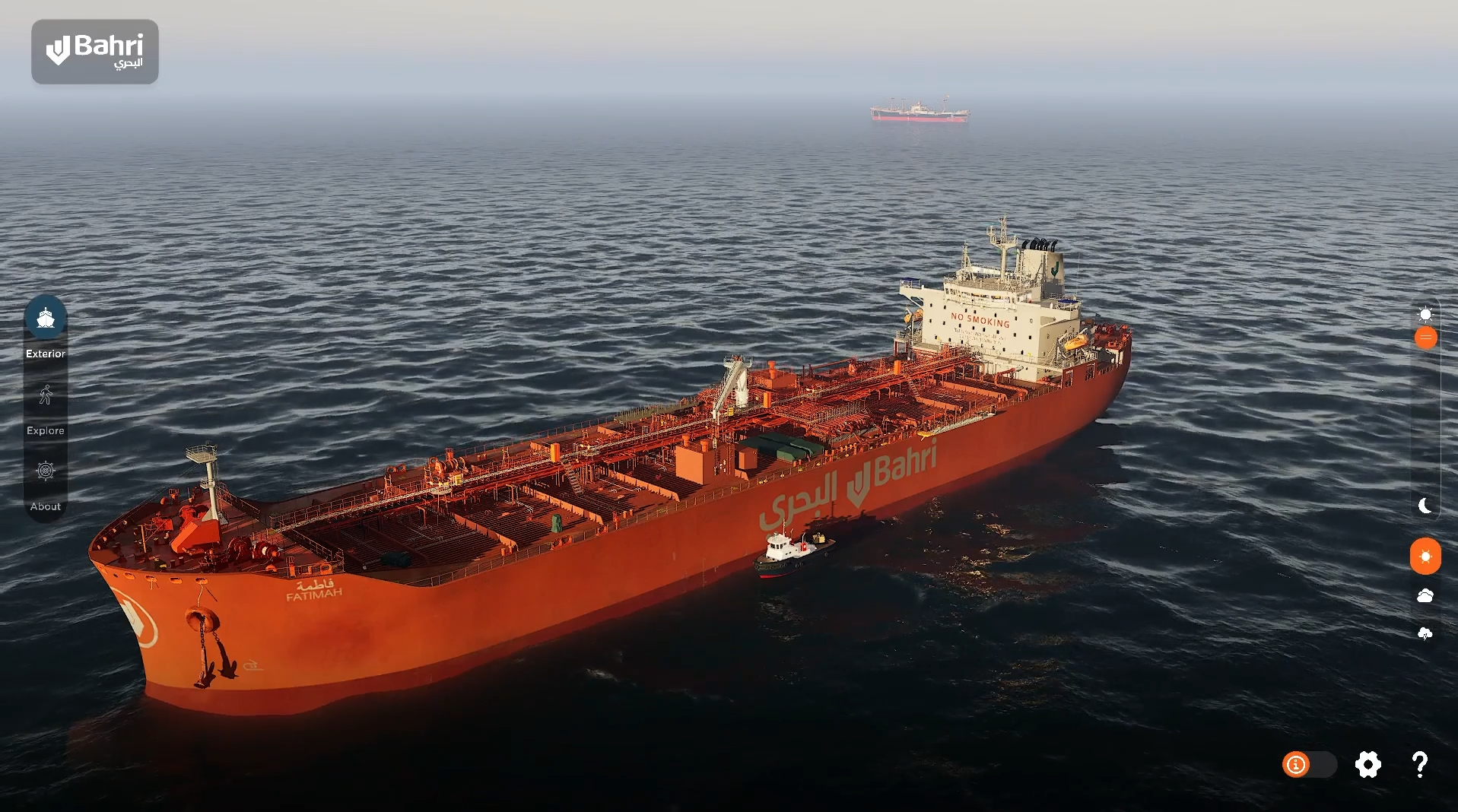
A ship is mostly the parts you can't see. Cargo tanks, bulkheads, framing, the systems running through the vessel, all of it sitting behind layers of structure. Which is exactly why a tanker is so hard to explain to anyone.
So we built a holographic cutaway. The internal structure gets exposed while the vessel stays whole, and you can see how the cargo tanks sit inside the hull, how the framing carries the load, how the spaces relate to each other.
This is the point where the experience stops being a model of a ship and becomes a way of understanding one. It's also, predictably, the view people ask for most in presentations.
One build, four ways to use it
This next part is the one we're proudest of, and it isn't a visual feature at all.
We delivered Bahri four things: a digital twin that runs on desktop and in the browser, a VR experience, a touchscreen kiosk, and a holobox. All four run off the same build. One geometry set, one material library, one lighting model, one set of zones, deployed four different ways.
In the browser. We use pixel streaming to deliver the twin to anyone with a link, so the application runs on remote GPU hardware and streams down like video. No download, no install, no gaming PC required. That's what makes remote training and remote presentations possible - a trainee in one country and a vessel in another, with nothing to install at either end.
In VR. The visitor wears the headset and nothing else. No controllers. A Bahri team member runs the session from a separate screen, sees exactly what the visitor sees, can lock their view onto a specific area and move them from space to space. That removes the thing that normally kills VR in a business setting, which is handing an executive two controllers and watching them fight the menu.
On a touchscreen kiosk. A podium kiosk running the vessel as a standalone experience, with the whole build sitting on the machine itself rather than streaming in. A visitor walks up and explores the ship with their hands, at their own pace, with nobody hovering over them and nothing to go wrong if the connection does - it runs with the network unplugged. Self-serve turned out to matter more than we assumed. People behave differently when nobody is watching them use something.
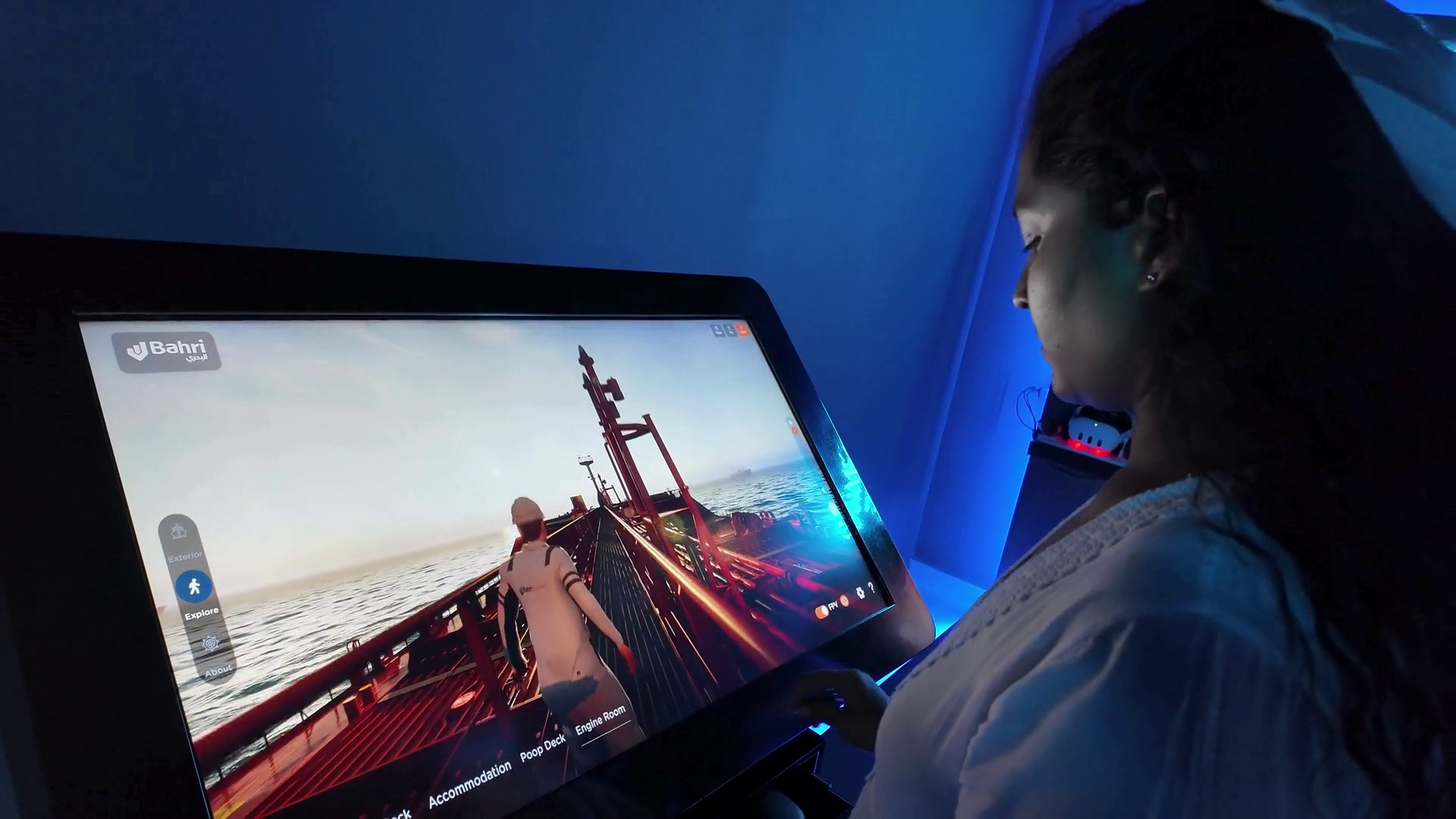
On the holobox. A holobox showing the vessel apparently floating inside the glass, driven by touch and voice. That one is for the visitors who are already in the building and are never going to put on a headset, and it does a job no screen does: people walk around it.
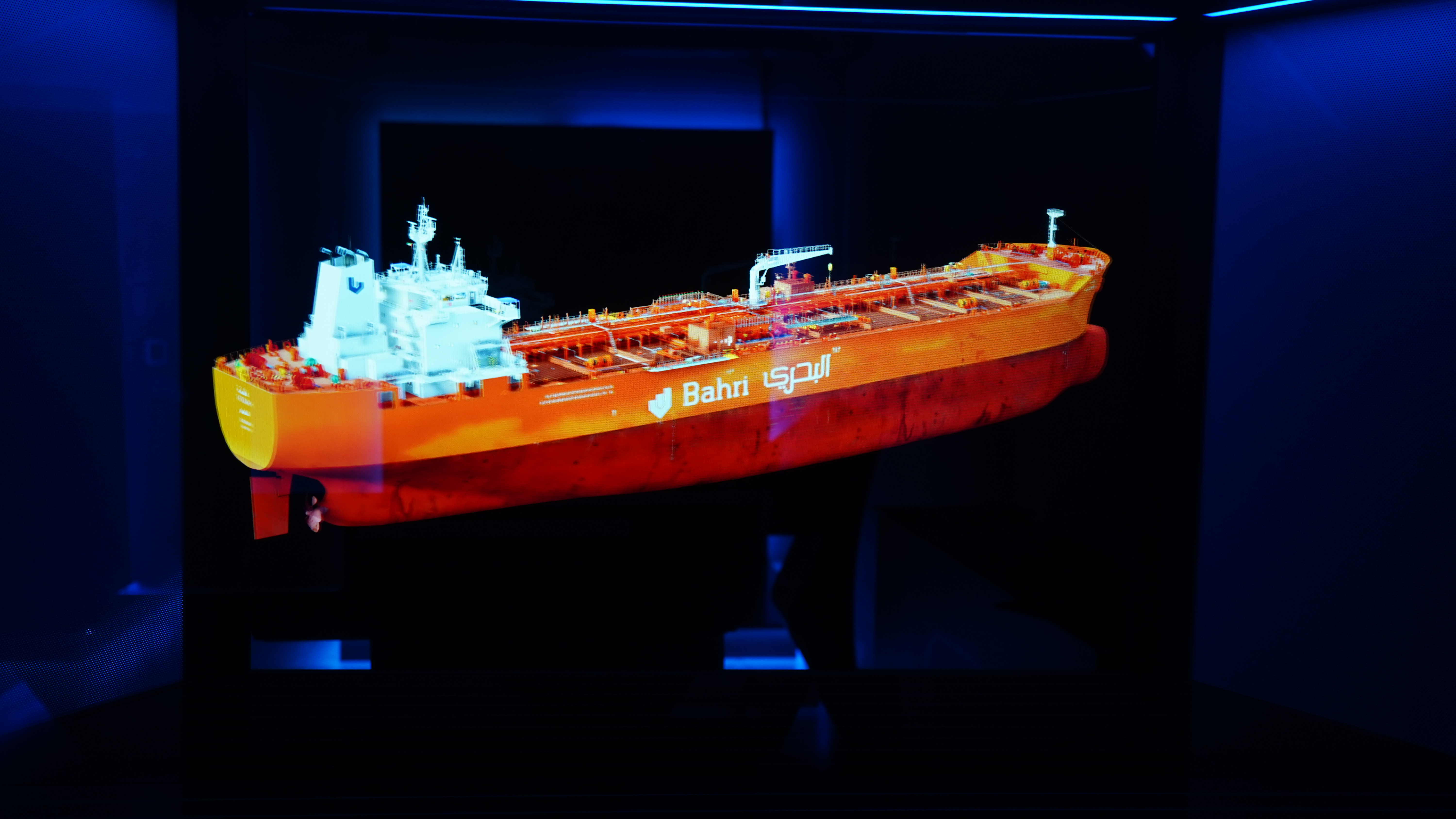
Three of those four now live together in Bahri's experience centre in a room with "Leading Through Innovation" on the wall - the kiosk podium, the holobox, and a presentation screen with a headset beside it. A visitor can walk through the vessel, be handed the controls, or be left alone with it, in the same room, depending on who they are.
Four very different situations. Four very different audiences. One asset behind all of them, and when the vessel is updated, everything updates together. That's the practical case for building this way rather than commissioning four separate projects: each experience after the first costs a fraction of it.
Three ways to move through the vessel
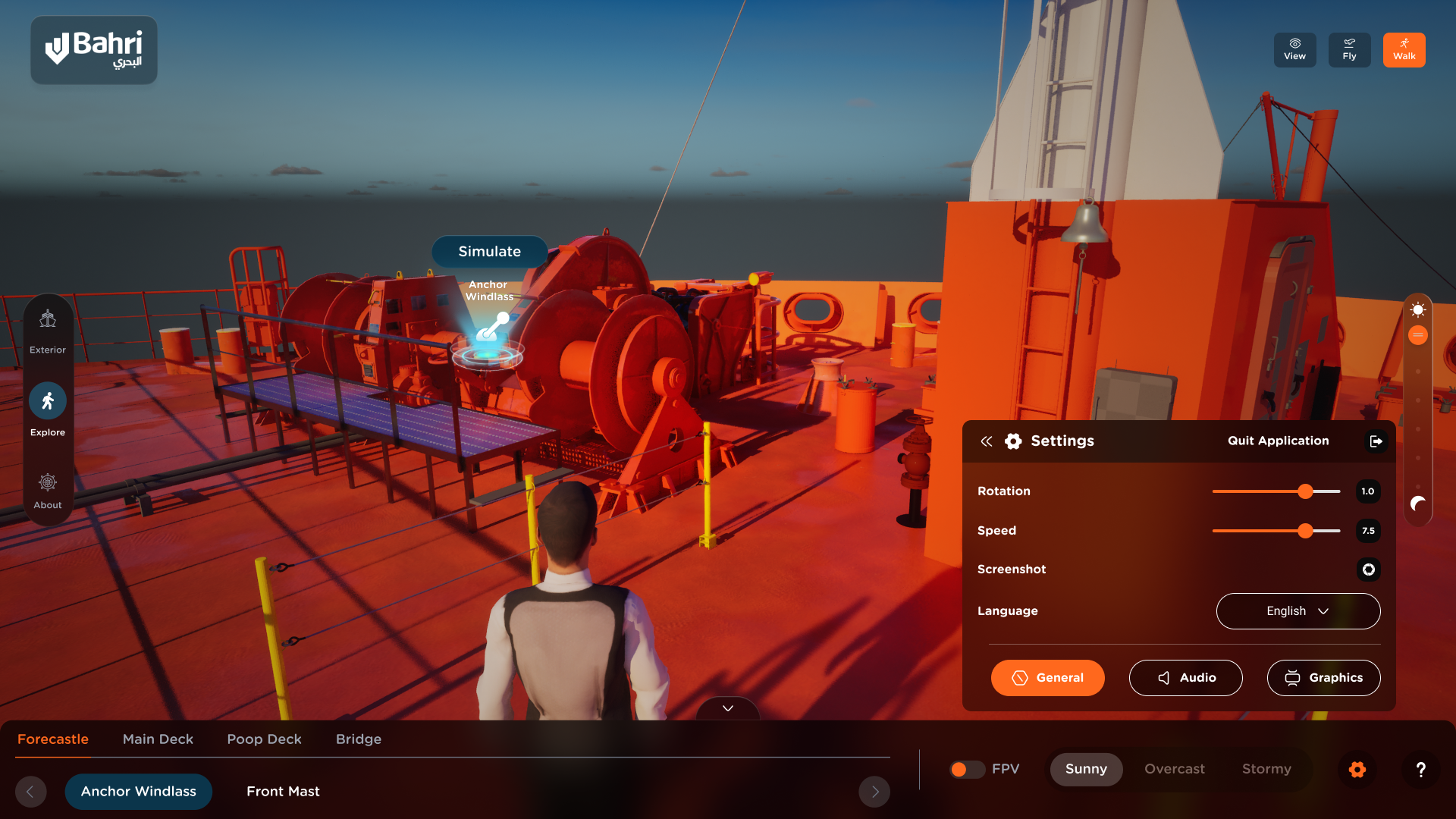
People don't all want to explore a ship the same way, so there are three modes.
Walk Mode moves you through the vessel on foot as a crew avatar, at human scale and human pace. This is the one that matters for training.
Fly Mode gives you a free camera to move around and above the tanker, for understanding the vessel as a whole object.
View Mode offers controlled, framed viewpoints for guided presentations, where the presenter wants certainty rather than freedom.
Beyond that, you can jump straight between zones and rooms, move between engine-room floors, switch to first-person, and interact with animated elements. From the exterior, you can rotate the vessel and zoom in and out freely, which is how most people start - turn her round, come in close on the deck equipment, pull back out to see the whole hull. Floor markers keep you oriented, which matters more than you'd think once you're three floors into an engine room.
The equipment itself is annotated, and this is where a lot of the quiet work went. Stand on the bridge and the consoles and instruments carry information hotspots - open the one on the radar, and it tells you it's an X-band marine radar, what it detects, and why it earns its place in poor visibility. Go down into the engine room and the same treatment continues, right down to the control panel for the main engine's high-pressure SCR system, with an explanation of what it does to the NOx reactor and why that matters.
Annotating a vessel to that depth is not a modelling problem; it's a knowledge problem, and it's the part that makes the twin usable by someone on their own. A person can work out what they're looking at without a supervisor standing next to them. That's the difference between a tool you can hand to someone and a tool that needs staffing every time it's opened.
There's also an AI assistant built into the experience. Someone standing in the cargo control room can ask what a system does, or where a space sits within the vessel, and get an answer without leaving the environment. It earns its place most with the people exploring alone, without a Bahri presenter next to them.
And before any of that begins, there's a cinematic introduction built with Unreal Engine's Sequencer, so nobody starts cold with no sense of what they're looking at.
Operations you can run, not just spaces you can visit
This is where the project stopped being a walkthrough.
Exploring a vessel tells you where things are. It doesn't tell you how they work, and for training purposes that second thing is most of the value. So we simulated the operations as well as the spaces. Anchor operations. The safety shower. Filling and discharging the vessel. Engine room procedures, run in the engine room itself rather than described in a classroom.
The difference matters. A trainee who has walked through the engine room knows the layout. A trainee who has run a procedure in that engine room, in the right space, with the right equipment in the right position, has done something much closer to the real thing. And they can do it repeatedly, at no cost, without the vessel being alongside and without anyone standing next to a live system.
That's also the reason the accuracy work earlier in the project pays off here rather than in the visuals. A simulated procedure is only worth running if the environment around it is where it says it is.
Monitoring a vessel that isn't there
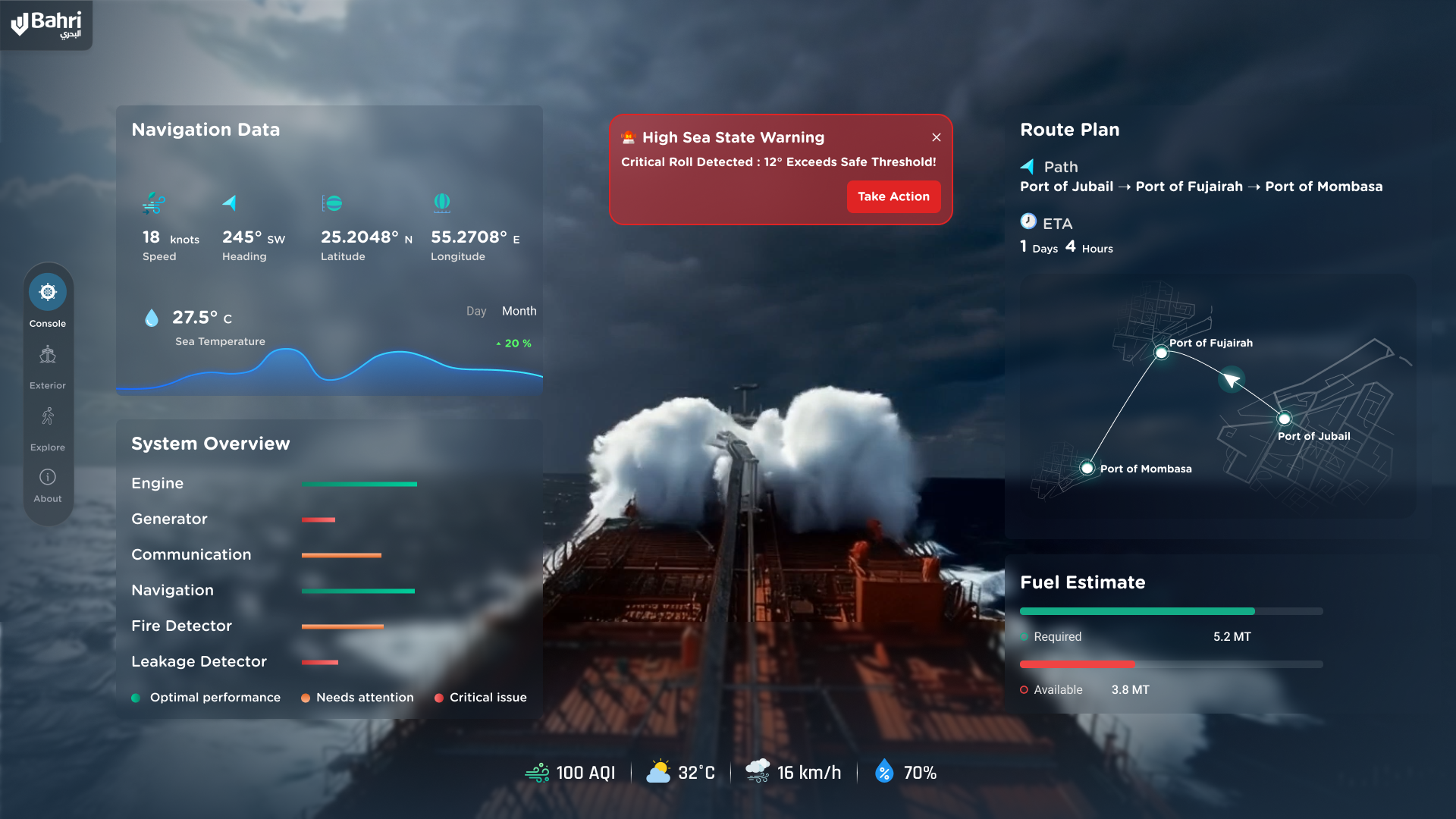
Alongside exploring the ship, the application has a console mode: a simulation of remote vessel monitoring.
From it you can call up tank levels, move between camera points around the vessel, and run incident scenarios - an emergency on deck appears on the exterior view with its location marked, and you can go and look at it. None of this is reading live data off the real Fatimah. It's a simulation of what monitoring a vessel remotely looks like when the vessel is a spatially accurate model rather than a list of readings.
That distinction is the point, and we'll come back to it. Building the monitoring interface as a simulation first is how you find out whether people can actually make decisions from it, before anyone commits to wiring a fleet's sensors into anything.
Steel, water and light
Accuracy makes an environment correct. It doesn't make it believable.
The vessel uses physically based materials for painted and weathered steel, machinery, piping, glass, rubber and plastic. Surface roughness, wear and texture detail separate one material from another and give the tanker some physical presence, instead of the clean uniform finish that immediately reads as "3D model."
The ocean matters more than we expected it to. A vessel floating on a grey background reads as an object. Put it in dynamic water with proper reflections and movement and it reads as a ship. Same geometry, completely different response from people looking at it.
Lighting does the rest. Outside, it's sky, sunlight and deck floodlights. Inside the engine room, it's artificial light, hard shadows and reflective surfaces, and the place feels entirely different as a result.
None of it is baked, which is what makes the next part possible. The application carries two slider controls down the side of the screen. One runs the time of day from dawn through to night. The other runs the weather, from a sunny sea through overcast to stormy, with tide states alongside it. Drag either and the whole environment responds in real time - the light moves across the deck, the sea state changes underneath her, the shadows follow. Same ship, different day.
Putting those on sliders rather than buttons was deliberate. Conditions at sea aren't three settings, they're a range, and being able to move through that range slowly is what lets someone see the moment a deck stops being comfortable to work on.
That sounds like a nice-to-have until you think about who's using it. A deck in a stormy sea at night is a different proposition from the same deck at noon in flat water, and anyone being familiarised with the vessel should see it in more than one state. A pre-rendered walkthrough shows you one set of conditions. This one lets you choose.
Keeping a ship this big interactive
Building a real-time tanker is a different discipline from producing renders. A render has to be right once, from one angle you chose. A real-time environment has to be right constantly, from wherever the user decides to stand, while they're moving.
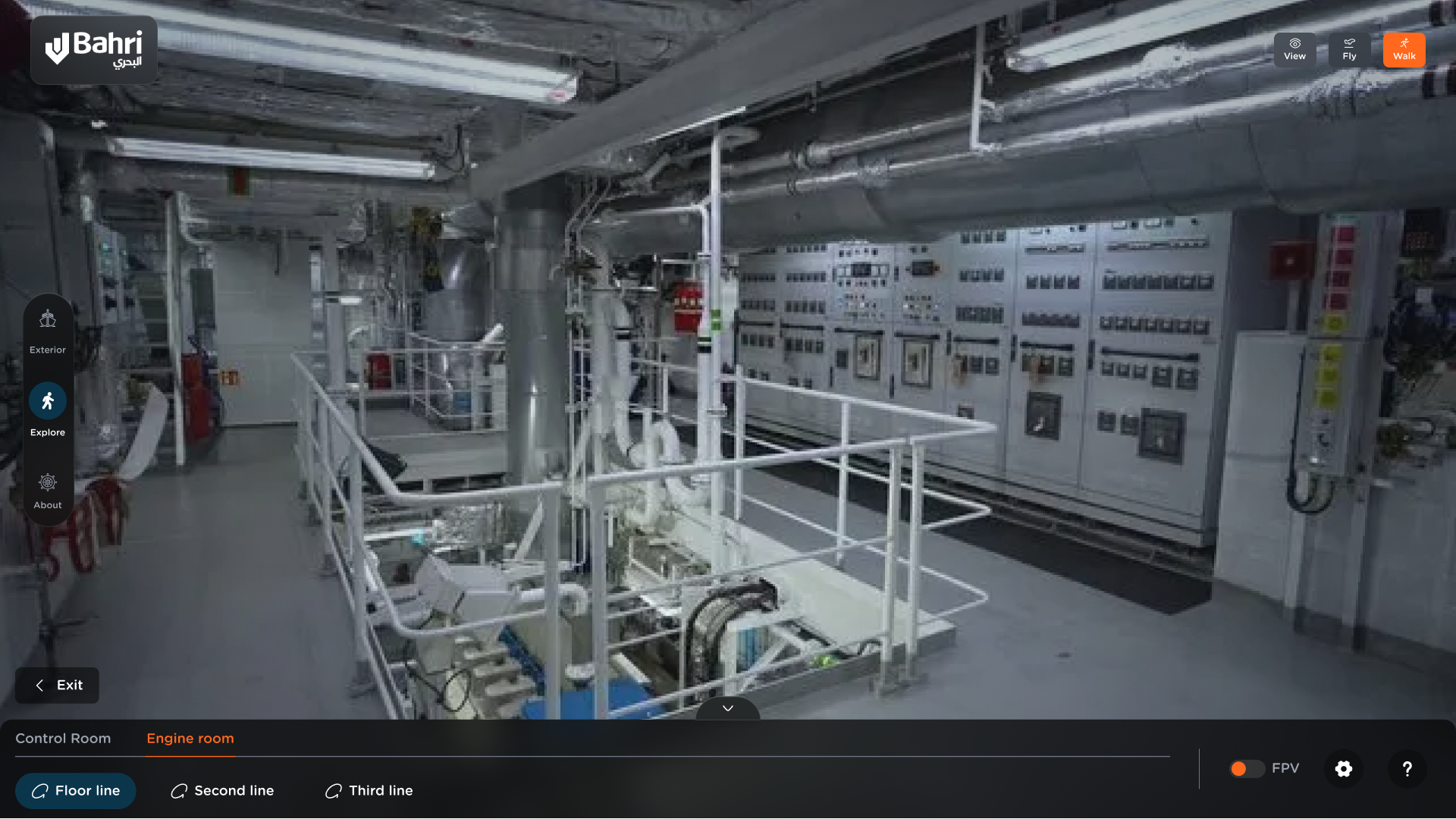
Ours combines a heavily detailed exterior, dense interiors, a lot of reflective surfaces, many light sources, and a large ocean around all of it. The engine room on its own is a serious rendering problem: multi-floor, packed with machinery, insulated exhaust piping, cable trays, control cabinets and gauges across the first, second and third floors, plus a dedicated control room.
Keeping it responsive came down to geometry optimisation, levels of detail, scene organisation, culling and zone-based streaming. Because the vessel is split into discrete zones, the experience only carries the detail and resources for wherever you currently are. That's what makes the jump from open deck into a dense engine room survivable. Unreal Engine 5 gave us the real-time foundation to hold the whole thing together in one environment.
What Bahri does with it
The twin isn't a showpiece sitting on a shelf somewhere. It's working across their business.
In investor presentations, the vessel and its systems get shown at scale, in the room, with the cutaway doing the heavy lifting on explaining the asset's structure.
In client and commercial conversations, prospective clients get taken through the cargo systems and the vessel layout without a port visit, a safety induction, or a flight.
It also lives inside the pitch deck rather than sitting apart as a separate demo, so it goes wherever the deck goes.
And in training, crew and staff move through the accommodation block and the engine spaces, run the simulated operations, and build a mental map of the vessel before they're physically aboard. Because we stream it, that training doesn't depend on where anyone happens to be. And because the model was reconciled against scan data, what they learn corresponds to what they'll actually find.
"PropVR delivered a first-of-its-kind digital twin of a live Bahri vessel, a working environment our teams now use for training, familiarisation and stakeholder walkthroughs that simply weren't possible before."
- Faisal Al-Husseini, President, Bahri Chemicals & Products
Is this really a digital twin?
Worth being straight about this, because the term gets used loosely and the maritime audience knows the difference.
What we built is a survey-accurate, interactive digital twin of the vessel. It represents the ship's structure, spaces, equipment and environments to measured accuracy, and it lets people explore all of that in real time across four formats. Because it was built from a physical scan matched against the drawings rather than from the drawings alone, it reflects the ship as built rather than as designed.
Think of it as phase one: the spatial model. Getting the geometry, the measurements and the environment right, to the point where the vessel exists digitally with the same accuracy it has in steel. That's the harder problem to solve, and it's the one that had to come first - you can't wire data into a space you haven't modelled correctly.
Phase two is already the plan. The monitoring console in the current build is a working simulation of what remote monitoring looks like on a spatially accurate model - tank levels, camera points, incident scenarios - built and tested so the interface questions are answered before anyone connects it to anything live. The next step is exactly that: bringing in live feeds, sensor data, and operational and maintenance information, so the environment that already knows where everything is starts knowing its condition too.
That's the roadmap - from a vessel people can understand, to a vessel whose condition they can monitor in real time. The spatial model was always the foundation for that, not a stand-in for it.
What this means for maritime
Ships, rigs, terminals and yards all share the same problem. The assets are enormous, expensive to access, and difficult to explain to the people whose decisions depend on understanding them.
The value of a maritime digital twin isn't that it looks impressive in a meeting. It's that an asset which could previously be shown to a handful of people, on a schedule dictated by operations, can now be shown to anyone, anywhere, in whatever format suits the room. A browser link. A headset. A kiosk someone walks up to. A holobox in the experience centre.
And because this one was built on measured reality rather than illustration, it holds up under the only scrutiny that really counts, which is scrutiny from the people who know the vessel best.
Bahri came to us with a very physical problem. How do you help someone understand a large, complex vessel when they can't simply step onboard? The answer wasn't another render.
It was five days on the ship, fifteen people over five weeks, and a real-time environment built in Unreal Engine 5 on top of two inputs matched against each other - what the drawings said, and what the scan found.
Because sometimes the best way to understand a ship is to step onboard. And sometimes you shouldn't have to.
See the Bahri vessel twin for yourself, or talk to us about building one for your asset - https://propvr.ai/contact
PropVR builds real-time digital twins and immersive experiences for real estate, infrastructure and industrial assets.